
Subscribe to:
Post Comments (Atom)

About Me

- My Personal Opinion
- Tooele, UT, United States
- I taught dance for many years as my children were growing up. We competed throughout the state of Utah eventually with great success. See: www.youtube.com/vicniesp. We eventually branched into drama and voice and performed shows in the local schools about staying away drugs and alcohol. That was a very fulfilling time in my life where I learned more and more about dance, choreography, voice, drama, acting, script writing, child development, and much much more. I now utilize those same skills to choreograph video and pictures to music. It has an equally fulfilling element for me to be able to see the same drama, emotion, and symmetry to videos and photographs to music. There are some artistic similarities that are very gratifying. Watching the recent explosion of dance and talent shows on television of recent is, of course very entertaining, but also brings out the judge in me. I've judged and critiqued dance, talent, and beauty contests over the years and can't help but have an opinion. I very much respect the excellent judges on hand for the show, but I would love to add my own critique and score.
Great Grandchild

This is a great example of how someone like me who's not so good with paper and scissors can take two digital images and match them up to digitally frame a picuture. You can now print this out., scrapbook it, frame it, share it online, whatever you want
My Favorite Picture

This is a perfect example of a picture that you may like of yourself, but it is in a picture with a group of people that you may or may not value. In this case, I value, the other people that were in this picture very much, but I can easily crop my image and utilize it in a myriad of new ways while still enjoying the original image as seen below.
Wedding Picture
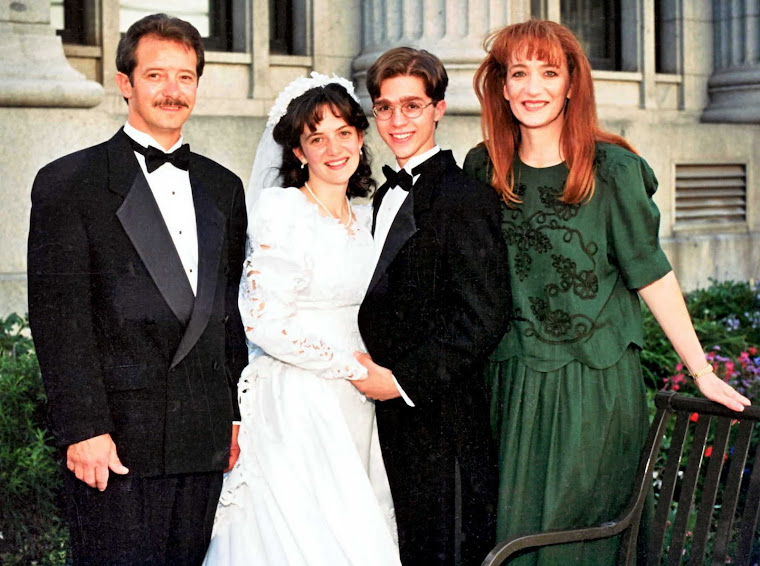
This a a wedding picture that has been scanned, cropped slightly and flaws have been erased. The picture above comes from this picture.
Mom & Dad

This picture is a awesome example of how we took the person on the right and the person on the left of the group picture above and then collaged them together so that it looks like the photographer actually took the picture himself, but he didn't.
Great Aunt Edith

This is a very old picture. Possibly 60 years old. This picture had a lot of flaws as you can see.
Great Auth Edith

This is an example of how an older picture that's been beaten up a little can be mended and enjoyed. Your also able to brighten the picture by bathing it in light. It's a remarkable difference. I'm not sure why it loaded so much smaller than the picture above, I'll try to fix that.
I love your work and how you bring all our memories to life. thanks for all you do, and I'd love to help you with your project in anyway. We are down one car right now, but I'll try to make it over soon to see you and grandma!
ReplyDelete